Development notes
Why TokenPeep exists.
TokenPeep started from a simple Codex workflow problem: when you are deep in a build, usage becomes invisible until a limit interrupts the session. The app is being built to make that usage visible without turning it into another large dashboard.
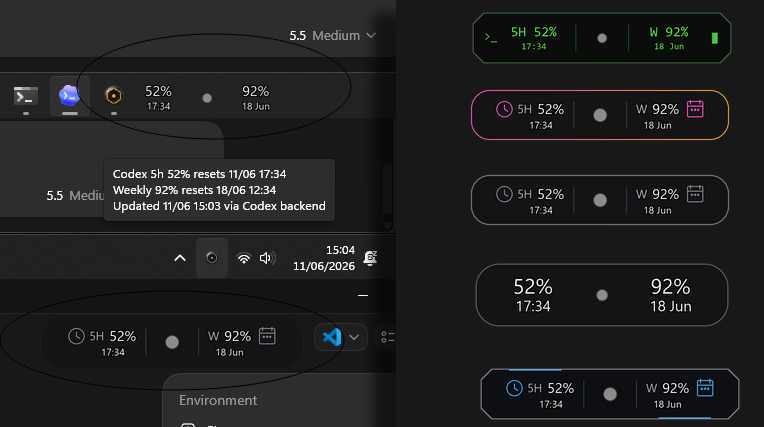 A tiny fuel gauge: 52% remaining in the 5-hour window and 92% remaining in the weekly window. Optional time and date refresh times below each percentage.
 The problem TokenPeep is solving
Codex can move a project forward quickly, but that speed makes usage harder to feel. A session can move from prompt to edit to test to fix without a natural moment to check remaining allowance. TokenPeep exists to keep the key usage numbers close enough that you can pace your work before a limit stops you.
TokenPeep does not try to change limits or optimize usage automatically. It gives you visibility: remaining 5-hour usage, remaining weekly usage, reset timing, warning states, and a recent drain signal.
Built with Codex, finished with judgement
TokenPeep is also a practical example of AI-assisted development. Codex helped move the project quickly, but the app still needed manual testing, debugging, copy review, packaging checks, UI tuning, and decisions about what not to build.
That matters because TokenPeep is aimed at the same workflow. When Codex is part of the build process, usage becomes part of the build process too. A small fuel gauge makes that cost visible while you are making product decisions.
Product principles
- Small over broad. TokenPeep is a focused Windows utility, not a SaaS dashboard or agent platform.
- Visible over noisy. Usage should be glanceable in the tray or optional OSD, not another workflow to manage.
- Local-first over account-first. The app does not need a TokenPeep account system to display usage.
- Precise privacy claims. The site should explain what the app reads, stores, and deliberately avoids.
- Windows and Codex first. One useful, testable platform beats vague promises across every platform.
What is implemented now
- Windows tray app with manual and automatic Codex usage refresh.
- Optional always-on-top mini display with saved position and off-screen recovery.
- 5-hour and weekly usage remaining, reset times, data source, last update time, and safe status text.
- Threshold warnings at 50%, 30%, 20%, and 10%.
- Recent 5-hour drain awareness and configurable drain threshold settings.
- Display formats, size presets, opacity, background, outline, and OSD themes.
- Start with Windows support and a Codex with TokenPeep launch shortcut.
Important limits and beta caveats
TokenPeep is an unofficial prerelease utility. It depends on Codex/ChatGPT usage metadata access continuing to work, and that source is not a public OpenAI API. If Codex changes the endpoint, auth behavior, or response shape, TokenPeep may need an update.
- Windows-first; Mac and Linux are not current release targets.
- Not an OpenAI Platform API billing monitor.
- Does not increase Codex limits or bypass usage restrictions.
- Clean-PC packaging validation, installer work, code signing, and auto-update flow are still future work.
- Public pricing and purchase terms should not be treated as final until announced on this site.
Privacy posture
TokenPeep runs locally on your Windows PC. It has no TokenPeep telemetry, analytics, account system, or developer-controlled hosted backend. It uses your existing local Codex login session to request usage metadata directly from ChatGPT/Codex.
The responsive activity indicator may scan recent local Codex session files for usage metadata and token-count activity when enabled. Those files may contain Codex conversation data, but TokenPeep is designed only to extract sanitized usage metadata. It does not extract, display, save, or upload prompts, conversation text, or private code.